Introduction

Welcome to the unofficial textbook for OCR A Level Computer Science (h446).
This book is actually just my notes organised in a way that is somewhat semblent of a textbook.
Please fact check a solid portion of the content against the spec, its very likely that information here is NOT what the exam board wants.
If you are taking AS-Level (why), refer to the specification for what’s necessary and what isn’t.
A live dev version can be seen on dev.kyuun.tech, which is only live whenever I have my editor open and I am actively writing parts of the book. It may contain changes that are not present on the live/stable version at book.kyuun.tech!
Important
Please note that this book is under HEAVY construction since I’m still going through the spec myself lol A large portion of the book will also need to be refactored and restructured.
The following chapters are considered mostly complete:
- 1.1.1
- 1.2.3
- 1.2.4
- 1.3.1
The last update was:

See changelog here
Changelog:

28/3/26 - v0.1.3
- Finished 1.1
16/3/26 - v0.1.2
v0.1.1 and v0.1.0:
- Created the damn thing i forgor what i did before this
Acknowledgements
Massive thanks to the following people:
- No Boilerplate for the excellent resources on Rust, memory management, and everything else in that area
- jhult for their fork of mdbook fixing my sidebar issue
- CXS, for being a brilliant teacher despite the hiring issues at the start of the year
- All the maintainers of rust-lang/mdBook for being chads
- And you, the reader for making this (not really) worth it
Systems architecture

1.1.1 Structure and function of the processor

The CPU (central processing unit) is the primary processor within a computer that is responsible for fetching, decoding, and executing instructions in order to process data and execute programs.
The CPU is split into a few different subcomponents.
Control Unit
The control unit (CU) is responsible for managing and directing the whole processor. The CU will decode the instructions using a binary decoder and perform any actions necessary to coordinate other components.
The CU is responsible for:
- Sending control signals to the memory controller for memory read/write operatins
- Decoding instructions
- Managing the ALU and its operations
Tip
If anything requires sending a signal, it’s often the CU responsible
Clock
The clock is an internal timer used by the CPU to coordinate and synchronise the processor’s operations.
The clock involves a continuous oscillaton between 0 (low) and 1 (high) states.
A clock period is the same as a wave period, which is the time between two high states or two low states.
Note
One CPU operation or instruction can take several clocks. For example, memory read/writes are infamous for being slow.
There are also additional CPU instruction sets, such as AVX-512 that involve significantly more complex instructions that require many more clock cycles to complete.
ALU
The ALU is responsible for any arithmetic or logical operations that need to be carried out.
The result from the ALU is automatically moved into the ACC.
The ALU generally performs the following tasks:
- Addition
- Subtraction
- Multiplication
- Division
- Boolean evaluation (AND, OR, XOR, NOT, etc)
Registers
Registers are small sections of the CPU that store data that is currently in use by the CPU. They are often only a few bytes wide (generally 16-128 bits wide), where the current standard is for CPUs to have their general registers at 64 bits.
Registers are the fastest data storage since they are embedded directly onto the CPU’s silicon.
There are both general use registers and dedicated/special use registers. The special use registers are named and have specific functionality within the CPU. General use registers can be used by the programmer (or compiler) to allocate data as desired. Often times, the general purpose registers are used as additional accumulators.
Tip
Many of these registers are self explanatory, so fall back on that in an exam where necessary!
Program counter
The Program Counter (PC) is the register that stores the address of the next instruction to fetch from memory and execute.
For example, if the CPU was about to execute a program and the first instruction of that program was at index 599, that is what would be stored in the Program counter.
Memory Address Register
The Memory Address Register (MAR) is a register that stores an address in memory where data is about to be read from or written to.
For example, if the CPU needed to read from a specific memory address (0x696969), this address would be stored in the MAR and then passed through the address bus.
This register will store the address that is going to be used for the next memory operation, whether it’s a read or write.
Current Instruction Register
The current instruction register is a register that stores the instruction that is currently being executed by the CPU. Pipelined CPUs will often have several CIRs to contain the instructions that are still being processed through the pipeline.
CIRs are necessary because of potential memory read/writes requiring the MAR and MDR to be populated with other things, so the instruction being executed is moved into the CIR to not be overwritten.
Memory data register
The memory data register (MDR) is the register that stores data that is about to be written to memory or data that has just been read from memory.
Tip
It can help to internally refer to this as the Memory Buffer Register (MBR), since that is a better descriptor of what this register actually does. OCR’s mark schemes have stated in the past
Allow Memory Buffer Register for MDR.
This register is often populated with results from the Accumulator, or with data that has been read from the system memory and passed through the Data bus.
This register is necessary since memory read and write operations are incredibly slow relative to the rest of the CPU due to the difference in clock speeds, so storing data here during a memory read/write reduces the chance that the CPU will stall from waiting for the memory controller.
Placing data into the MBR ensures that the memory controller (connected to the data bus) can read/write at its own pace, without forcing the whole CPU to wait for it.
Accumulator
The Accumulator (ACC) is the register that stores the result from the ALU. The two are directly connected, where the output of the ALU is automatically moved into the ACC.
Status register
Caution
Not clear whether this is in the spec.
The status register (SR) is a register that contains different flags regarding the state of the CPU. Generally this will contain information regarding the last operation from the ALU.
Each bit of the status regiter correlates to a different flag. So the first bit of the SR could correlate to whether an arithmetic operation contained a carry, while the second bit could be whether to disable or enable CPU interrupts.
These are often the same size as the word size of the CPU (64, 32, 16 bit, etc.)
Interrupt Register
Important
This register is important within 1.2.1: Systems Software. Refer to that chapter for more information
The Interrupt Register (IR) is a special use register similar to the SR where each bit correlates to a different interrupt.
Different interrupts will have a different bit assigned, which is also used to identify where the interrupt originated from.
At the end of each FDE cycle, the CPU will check the interrupt register for any unmasked interrupts or any interrupts that are higher priority than what is currently being executed and then set the PC’s contents to the address of the associated ISR if necessary.
Buses
The CPU contains different buses which are responsible for communication and the transfer of data between components.
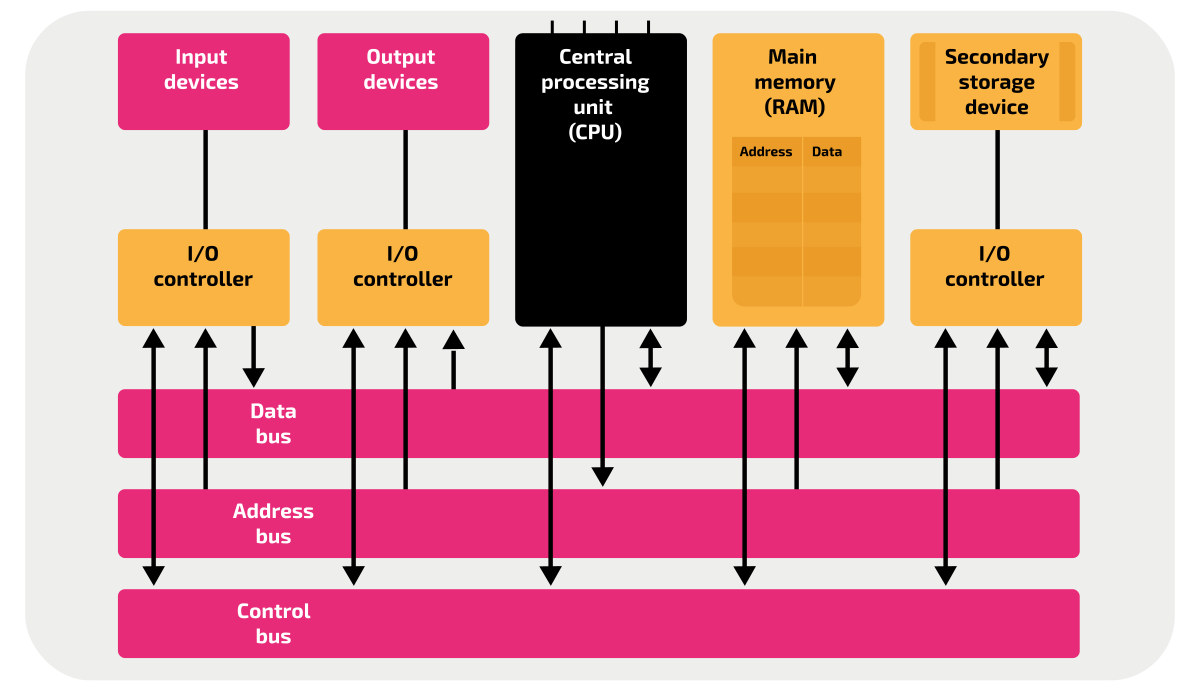
System buses are composed of parallel connections that connect two or more components within the CPU.
External buses are buses that connect the CPU to external components such as peripherals.
The width of a bus determines how many bits can be transferred in one operation, often in multiples of 8 bits.
Address bus
The address bus is a bus that connects the CPU’s MAR to the main memory and I/O controllers. It is unidirectional outwards from the MAR.
The width of the address bus determines how many memory addresses can be accessed. An address bus with a width of n bits, then there can be \( 2^n \) possible addresses. This is also the limiting factor in the total memory capacity of a system.
Data bus
The data bus is a bidirectional bus that connects pretty much everything to the CPU. It can contain data and addresses.
The data bus can allow data from input devices to be passed into the CPU, and also data to be written to output devices from the CPU.
Control bus
The control bus is a unidirectional bus that transmits control signals from the CPU’s control unit to other components inside and outside of the CPU.
The control bus is used for tasks like:
- Memory read
- Memory write
- Bus requests/grants
- Interrupts
- Clock signalling
FDE Cycle
When the processor needs to carry out an instruction, it will perform the FDE Cycle.
The FDE cycle is a set of 3 stages that the CPU repeats in order to execute an instruction.
The FDE cycle assumes that the instructions are already present in RAM as machine code.
Fetch
The FDE cycle begins with fetching the next instruction from RAM.
As stated before the PC contains the address of the nexxt instruction to be executed, so the address in the PC is copied into the MAR before being incremented to the next address for the next cycle.
Important
In the case of a branch, interrupt, or any other circumstance where the next instruction is not at n+1, the PC will be set accordingly
The MAR now contains the address of the next instruction. The CU can now issue a request to the MAR to pass the address down the address bus, and then issue a memory read signal to tell the memory controller to copy the value stored at that address into the MBR, moving it through the data bus.
Now that the MBR contains the next instruction, copied from the main memory, the contents of the MBR are copied into the CIR to be used in future stages.
This is because operations from the instruction being executed may need to utilise the MBR.
Decode
The decode stage involves converting the instructions fetched into the opcode and operand needed to actually determine and execute the new instruction.
The opcode determines what operation to perform, while the operand are the ‘arguments’ to the operation, such as registers, addresses, immediate values, etc.
Note
I think that’s it for this section, I don’t actually know and the spec is vague anyways
Execute
Now that the instruction has been decoded, it can now be executed.
At this point, the CPU’s execution can vary since it will depend on what instruction is currently being executed. The following are some common situations.
| Arithmetic | The numbers are fetched from memory and stored in the general purpose regsters, where the ALU performs the operation on them, storing the result into the ACC. |
| Logic | Two booleans are evaluated by the ALU, often stored in the GPRs or the MBR, or wherever |
| Memory write | The value being written to memory is copied into the MBR, and the address to write to is copied into the MAR. The CU issues a memory write request, where the address is copied through the address bus to the memory controller. The memory controller receives the data to write through the bidirectional data bus, where it can then write the data to the memory address specified. |
Pipelining
Pipelining in the CPU is where the CPU will separate instructions into a variety of different stages in order to parallelise the execution of the instruction.
This in turn can increase efficiency and processing speed. In modern computers, this is possible because of different parts of the control unit being used to perform different things such as the fetching being done separately to the execution.
In cases like the FDE Cycle, the stages are quite distinct, isolated, and repetitive so they can be pipelined. By utilising additional registers to store the intermediate results of the different stages, the different stages can occur at the same time (for sequential instructions).
The following diagram (from wikipedia) is the best descriptor of this.

Caution
Some of the following sections are copied directly from my SLRs. Rewriting them will occur later if ever
CPU Model Architecture
The CPU is often abstracted into two models, the Von Neumann Architecture and the Harvard Architecture. Both of these concepts are useful in modern processors, however a mix of the two is generally used in modern systems.
Von Neumann
The Von Neumann model is the first and simpler model, where the instructions and data are stored in the same space in memory. The memory and data bus is also shared in the VNA, which can potentially lead to bottleneck issues when transferring larger and larger amounts of data.
The Von Neumann bottleneck is a consequence of only having one bus between memory and the CPU. The bus can only read data or memory one at a time, limiting the CPU throughput significantly. VNA also has the consequence of potential for overwriting code by accident, since data and instructions are stored in the same location.
Harvard
The Harvard architecture was designed to improve upon the Von Neumann architecture, where instead of having a unified bus and cache for data and instructions, it would separate to two to allow for concurrent read and writes.
This in turn can increase the overall performance, as the CPU can do 2 slow operations at the same time, instead of doing them in sequence. The division of the instruction and data memory also means that they can be resized accordingly, improving optimization and making it more flexible for the developer if they wanted to have different properties for each type of memory. (RO or RW, etc.)
The Harvard architecture also has the benefits of being able to utilise Out-Of-Order Execution (running independent instructions while waiting for IO bound instructions to complete, preventing pipeline stalling), superscalar execution (multiple instructions in one clock cycle), and other execution optimisations.
-
Credit to Isaac Computer Science, under OGLv3. ↩
1.1.2 Types of processor

We have many different types of processor, all designed to complete different tasks. Some processors are designed to accelerate specific tasks, while others are designed to be general purpose.
CPUs can be separated into two families, being CISC and RISC.
Processor architectures
Rising from different philosophies, modern processors fall under two groups, being RISC and CISC. They both have different properties, pros, and cons that may make one architecture more suitable than the other.
RISC
RISC (Reduced Instruction Set Computer) is one of the two main CPU architecture in use. It is present in most mobile devices, embedded computers, microcontrollers, and is growing in use in laptops and servers particularly by Apple with their M-series and Qualcomm with their Snapdragon X lineup.
RISC processors maintain the philosophy of one operation per one instruction within one clock cycle.
This results in RISC processors having much fewer and less complicated instructions compared to CISC since they perform less and theres fewer operations that need to be given a dedicated instruction.
Something simple such as adddition could take many instructions such as loading the values from memory and then calling the add instruction.
Additional traits of RISC:
- Easier to pipeline since each instruction is predictable and simple
- RISC programs require more ram to store the additional instructions
- RISC processors are generally more power and heat efficient
- Fewer abstractions
CISC
CISC (Complex Instruction Set Compiter) is the CPU architecture most commonly used in desktops and laptops.
Note
For additional reading on CISC instructions, see this video on strange x86 CPU instructions
CISC processors are significantly more complex (hence the name) compared to RISC processors, as these processors are capable of having single instructions that can perform multiple tasks.
Generally, these instructions wrap around the simpler instructions.
For example, the instruction DPPS ( Dot Product of Packed Single Precision Floating-Point Values) from the AVX SSE4.1 instruction set does significantly more than just one operation.
CISC processors will have more instructions than RISC, since there’s more clock cycles that can be allocated to a single instruction.
Additional traits of CISC:
- Simplifies compilation because the instructions can more closely resemble higher level statements
- Could also make the optimization stage more difficult
- Less heat/power efficient
- Physically larger
- Lower memory usage#
Parallel processing
Parallel processing is where multiple tasks are completed separately from each other, resulting in all of the tasks being completed in a shorter time than if they were to be executed sequentially.
Systems with more cores are capable of executing more tasks in parallel.
For systems without multiple cores, a single core can make use of threading, which is a form of concurrency on a single core.
Caution
Concurrency and parallelisation ARE DIFFERENT.
See this video (2:04-3:07) for the explanation, though I highly recommend watching the whole video.
Feel free to ignore the Rust specific parts. From what I know this is on the specification.
The negatives of parallel processing
Parallel processing may not guarantee a speed increase. Often, it can cause bugs and rarely cause slowdowns.
When performing parallel processing, the task needs to be allocated to the different cores/processors, which induces a small overhead.
In the cases of small tasks being parallelised, the overhead of allocating many different tasks could overshadow the speed benefit of parallelising the task in the first place.
Parallel processing is also significantly harder to program and utilise.
The Rust Programming Language Book phrases this very well:
Splitting the computation in your program into multiple threads to run multiple tasks at the same time can improve performance, but it also adds complexity. Because threads can run simultaneously, there’s no inherent guarantee about the order in which parts of your code on different threads will run. This can lead to problems, such as:
- Race conditions, in which threads are accessing data or resources in an inconsistent order
- Deadlocks, in which two threads are waiting for each other, preventing both threads from continuing
- Bugs that only happen in certain situations and are hard to reproduce and fix reliably
These possible circumstances make development and testing with parallelism very difficult in comparison to single threaded programming. It’s up to the programmer to determine whether it is worth it or not to implement parallelism/concurrency.
Coprocessors and Accelerators
Along with our primary processor (generally the CPU), there can also be additional processors that tasks can be delegated to.
Co-processors are specialised processors that are capable of doing specific tasks much faster than the CPU can. Things like floating point arithmetic, cryptography, matrix multiplication, and other easily parallelised tasks are frequently offloaded to such coprocessors.
Hardware acceleration will often use coprocessors such as a GPU or NPU/TPU, which will offload computationally intensive tasks onto the additional device. This can improve render times and performance overall as these devices are Mathematically intensive tasks like rendering, ML workloads, etc, will almost always be offloaded to the GPU, as it is able to perform orders of magnitude faster than the CPU in these tasks.
Here are some common coprocessors:
Note
You don’t need to know any of these except for the GPU.
| Acronym | Full name | Task |
|---|---|---|
| GPU | Graphics Processing Unit | Rendering graphics, Parallelised arithmetic |
| NPU | Neural Processing Unit | AI and machine learning |
| TPU | Tensor Processing Unit | Variant of an NPU by Google for neural networks |
| QPU | Quantum Processing Unit | Quantum computing |
GPUs
The GPU (Graphics processing unit) is a specialised processor originally designed to accelerate the computation of graphics and 3D space.
GPUs in comparison to CPUs will instead pack the die with thousands of cores to maximise the capabilities of the parallel processing.
Since the only thing the GPU will be doing is completing tasks sent from the CPU, it does not need nearly as much silicon space for administrative parts.
| GPU | CPU |
|---|---|
| More cores | Less cores |
| Simpler cores | complicated cores |
| Specialised for parallel processing | Specialised for sequential processing |
| Computes more specialised tasks | Computes more general tasks |
1.1.3 Input, output and storage

Software and software development

1.2.1 Systems Software

1.2.2 Applications generation

Stages of compilation
Compilation is split into several stages:
Lexical analysis
The source code is tokenised into a stream of tokens, which are the basic building blocks of the language (e.g. keywords, identifiers, literals, operators, etc.).
Syntax analysis
The stream of tokens is parsed into a syntax tree, which represents the structure of the program according to the grammar of the language.
Semantic analysis
The syntax tree is checked for semantic errors (e.g. type checking, variable declaration, etc.) and annotated with additional information (e.g. symbol tables, type information, etc.).
Intermediate code generation
An intermediate representation of the program is generated, which is often a lower-level representation that is easier to optimize and translate into machine code.
Optimization
The intermediate code is optimized to improve performance, reduce memory usage,or achieve other goals (e.g. inlining, loop unrolling, dead code elimination, etc.).
Code generation
The optimized intermediate code is translated into machine code or assembly language, which can be executed by the target platform.
1.2.3 Software development

SDLCs
When developing software, teams will often utilise different software development lifecycles (SDLCs) in order to organise and schedule development.
Stages of an SDLC
SDLCs are generally split into a few common stages to describe the different stages of development during a project’s lifecycle.
Analysis
In this stage, the stakeholders will first provide the requirements for the finished product. These requirements will be used to
- Define the problem
- Estimate the feasibility of the project
- Deciding on the scope of the project
- Determining profitability
The point of this stage is to understand the problem provided by the stakeholders, decide whether the project is worth or possible undertaking, and what they want the finished product to be able to do.
This is essentially the same as the analysis section of the programming project.
Design
Design is where the requirements provided in the analysis stage are converted to a project plan.
This is where technical details such as choice of language, framework, hardware, etc will be made.
Most aspects of the program will be identified and scaffolded in this stage, such as:
- Inputs
- Outputs
- UI design
- Security
- Performance
Development
This is where a large portion of the project’s lifecycle will be.
Development is where the plan created in design will be converted into a collection of modules, where teams can then be allocated to work on coding the program.
Modules are ideally self contained, as this improves the ability for a team to work in parallel.
Testing
Testing is grouped into different categories to fit different stages of development. These strategies will be ideal for different circumstances, and will have different objectives or focuses.
White box testing
White box testing is the in-house testing of the code’s structure and algorithms. White box testing focuses on the code itself, and therefore requires knowledge of how the code is written. White box testing is used across the development cycle, and is consistently used to monitor for regressions.
White box testing often involves:
- Unit tests
- Valid, invalid, boundary and erroneous data
White box testing is often automated using Continuous Integration (CI) tools, or utilities that are part of the language/framework’s ecosystem, such as cargo test in the Rust ecosystem.
Black box testing
The goal of black box testing is to check the functionality of the program, ignoring anything unrelated to such, including the code quality or structure.
Black box testing is performed by the end users, where their feedback will be used to refine the functionality.
Alpha testing
Alpha testing is any testing performed by the in house developers, or other employees of the development company/department during the development stage. This will involve the early release of an in-development build of the program, where features may be missing or non functional.
Alpha testing will focus on pinpointing and fixing early bugs that may critically affect the program, and to give an idea of the current state of development.
Beta testing
Beta testing is carried out similarly to alpha testing except instead with the end user using the build, where they will be allowed to use the program as they expect. The beta build will be often made after the main development has completed and functionality is present. The end user will then provide feedback to the developers on any remaining issues regarding the program.
Beta builds are often very close to the final release of the program, where the only thing stopping the final release is quality control.
Warning
Regression and acceptance testing are not in the specification. However it’s probably good to know
Regression Testing
Acceptance Testing
Implementation
After a build is passing all tests and has been approved by the client, the program can then be installed onto production servers or systems. Implementation also often involves the additions of application tweaks such as DRM and digital signatures. It can also involve setting up distribution, such as pushing updates or creating download servers/CDNs
Evaluation
Maintenance
System development methodologies
The above stages can be grouped together in different ways to create System development methodologies, which determine how teams will approach the development of a project.
Waterfall
Waterfall is a linear SDLC where each stage is completed sequentially, cycling round each time. The structure is highly rigid, where if the team needs to go back to a previous stage, the stages from then and the most recent stage must als obe repeated. In addition, the users generally only give any feedback to the development team near the start or end of a waterfall cycle, therefore making changes is tedious and difficult with this paradigm.
Advantages:
- Clear milestones
- Easy to produce good documentation
- Simple management
- Very predictable
- Well understood and well known
Disadvantages:
- Inflexible to requirement changes
- Mistakes need to be caught during the stage they appear, otherwise backtracking stages is expensive
This is probably the simplest SDLC, but is also being phased out for the agile methodologies .
Spiral
The Spiral model is a similarly iterative SDLC that takes the ideas of Waterfall, but injects additional risk assessments after the analysis stage. The spiral model is generally split into four stages in the following order
| Stage | Purpose |
|---|---|
| Analysis | Identifying requirements and feasibility |
| Risk assessment | The risks are identified and mitigated where possible |
| Development | The project is developed and tested |
| Evaluation | The project is evaluated for how successful it was, and the next spiral continues as the next iteration |
The spiral model is used for projects that are high risk and high cost, where the additional risk assessments are necessary. Every spiral’s evaluation stage will feed into the next spiral’s analysis to inform the next iteration.
Advantages:
- Extensive risk management
- Evaluation feeds into the next iteration
- Simple
Disadvantages:
- Costly
- Time consuming
Rapid Application Development (RAD)
When the inital requirements are unclear and the project scope is relatively small, RAD can be used.
RAD is an iterative methodology that involves the development of many early prototypes that are then presented to the client.
The development team will take the feedback from the client to produce the next prototype.
Eventually, after enough early prototypes, the prototype will match the requirements of the client, where it can then be presented as the finals solution.
Advantages:
- Fast delivery of functional prototypes
- strong user involvement
- flexible to requirement changes.
Disadvantages:
- Less suitable for very large systems
- Potential for scope creep
- Depends on availability of end users.
Agile
Agile describes a family of iterative methods that prioritise flexibility during development. Generally, the development team will focus on different aspects of the project at the same time, therefore allowing development to be completed in parallel.
The team will focus on producing a prototype early on which can be presented to the client for feedback. This delivery of prototypes continues throughout the lifecycle as well.
Advantages:
- Frequent prototypes
- Continuous customer feedback
- Versatile
- Common in workplaces
Disadvantages:
- Requires disciplined teams
- Requires constant stakeholder engagement
🔥Extreme Programming🔥
Extreme programming is a subset of the Agile methodology that emphasises engineering practices to improve code quality and responsiveness.
Extreme programming generally involves pair programming, test‑driven development (TDD), continuous integration, simple design and small frequent releases as these are all techniques that focus on specific code quality.
Advantages:
- High code quality
- Rapid response to change
- Strong developer collaboration.
Disadvantages:
- Requires more teamwork
- Requires 2 developers per section/session
- Clients may not be available
1.2.4. Types of Programming Language

Programming languages follow different paradigms, depending on the philosophy of the community and decisions by their creators.
A programming paradigm is the style or model in which a programming language uses.
Different languages utilise different paradigms, or can even support multiple, becoming the programmer’s choice as to which to use. Some paradigms will be more useful in solving a specific problem than another, therefore it should be decided which to
Warning
Function and procedure are used mostly interchangeably by me within this chapter. Functions return a value, procedures do not. This is an important difference that you should take note of.
Procedural languages
TLDR:
- Programmer specifies steps needed to complete the program
- Statements are grouped together in procedures and functions
- Variables can have varying scope (local/global)
- Logic is expressed in chains of imperative procedure/functioncal calls
Procedural is the easiest and simplest paradigm, involving a chain of instructions that are executed sequentially. The execution of the program goes from top to bottom, where most functionality is contained within defined, imperative functions.
Procedural languages are the stereotypical programming languages, making use of the typical concepts of data structures, sequence, selection, iteration, functions, etc.
Variables in procedural languages are defined to have either a local or global scope.
- Local scope is where the variable is obly available within the function
- Global scope is where the variable is accessible throughout the program and across all functions
Object-Oriented languages
TLDR:
- Data is grouped into objects
- Objects contain methods and attributes which belong to their instance
- Instances are self contained
- Objects can be reused and inherited across the codebase
- Logic is expressed as the relationship between objects
Note
For the exam, you will need to be familiar with OOP concepts, and how they work in OCR Reference Language
The concept of OOP is to produce reusable, self contained, or encapsulated, objects that interact with each other to form logic and represent data. OOP is frequently used in the modern day due to the self contained nature of different structures. Thus has the benefit of making debugging easy, while also simplifying the relationships between data.
OOP utilises access modifiers to control who or what is able to access the data stored within an object.
The private keyword means that the method or attribute can only be called/accessed from itself.
The public keyword means that other objects can access/call attributes/methods within the class.
For example, consider the following class:
public class Pet {
    public String name;
    public Float hunger;

    public Pet(String name) {
        this.name = name + " " + "Ayana";
        this.hunger = 10.0;
    }

    public String getName() {
        return this.name;
    }

    public void feed() {
        this.hunger = this.hunger - 1.0F;
    }
    private void eat(String name) {
        this.hunger = this.hunger + 1.0F;
    }
}
This is an example of a class, representing a simple pet. The pet has a name that is set when a new pet is created. The name is a property of the class, or an attribute.
The pet also has a method which manipulates the data of the instance of Pet.
The pet also has a private method that only the pet can access.
This pet is encapsulated, where data is self contained, data that relates to the pet is an attribute of the pet, and the data of the pet can be manipulated by using provided publicly accessible methods.
Encapsulation is defined as packaging behaviour and data within a class, and access to a class's data is controlled through **getter** and **setter** methods.

Getters and setters return or set private attributes.
Other objects can inherit traits and attributes from the parent class.
Consider the following child class:
public class Dog inherits Pet {
    public Boolean tailWagging;
    public Dog() {
        this.tailWagging = true;
    }

    public void toggleTailWag() {
        this.tailWagging = !this.tailWagging;
        this.hunger = this.hunger - 1.0;
    }

}
The above class Doginherits the attributes and methods from Pet, even though they aren’t explicitly declared within Dog.
For example, I didn’t declare float hunger; at the top of Dog, yet it’s still accessible within toggleTailWag().
Taking this into account, you can also call the .feed() methods on the Dog class, as it is also inherited from Pet.
Caution
Private methods are not inherited, so you cannot call
.eat()from any subclasses.
However, what if you wanted to inherit from another class, but you needed to modify a specific method’s behaviour?
This can be achieved using polymorphism.
Consider the new mechanical dog that doesn’t need to eat.
public class RoboDog extends Pet {
    private Boolean tailWagging;
    public RoboDog() {
        this.tailWagging = true;
    }

    @Override
    public void feed() {
        throw new UnsupportedOperationException("It's a robot, it isn't hungy!");
    }

    public void toggleTailWag() {
        this.tailWagging = !this.tailWagging;
        this.hunger = this.hunger - 1.0;
    }

}
Since robot dogs cannot eat anything, but are still pets, we need to alter the inherited feed method to throw an error when we try to feed the robot dog.
In Java, this is notated with the @Override decorator (don’t worry about this), telling the compiler that when we call .feed() on an instance of the subclass RoboDog, we need to throw an error. If we didn’t do this, the default .feed() from the parent Dog class would be used, which is not what we want.
This concept of modifying behaviour based on their subclass is referred to as polymorphism.
In short, these child classes (referred to by the exam board as subclasses), encapsulate data and behaviour using attributes and methods, which can then be inherited from the parent class (super class), allowing behaviours to be modified through polymorphism.
Assembly languages
- Low level
- 1-1 conversion to machine code
- Specific to processor architecture
- Uses addresses to reference data
Assembly language is a low level family of programming languages that give you direct control over the machine code being executed by the CPU. You have direct control over what is stored and moved within each register.
Assembly revolves around the concepts of op-codes and operands, which map directly to machine code.
Consider the following LMC assembly:
LDA #50
ADD #1
OUT
In the first line, the instruction is LDA #50, where the op-code is LDA and the operand is #50. The op-code deterines what the CPU should do with the data provided (the operand).
The above program will load 50 into the accumulator and add 1 to it, then outputting it.
Since assembly has almost no abstractions over the raw machine code, things such as data types don’t exist and control flow is limited. Instead, data is read and interpreted as raw bytes, and if statements are limited to jumping to certain addresses based on conditions.
Little Man Computer Instruction Set
Caution
You need to know the instructions in LMC and how to write programs with LMC assembly.
The LMC Instruction Set is a simplified form of Assembly, where you manipulate
Declarative languages
Declarative lanugages are not in the specification, however you will be familiar with them. These are languages that describe what needs to be done, rather than how it should be done, essentially providing what the final result should be. SQL and HTML are considered declarative languages, as they define how the output from the database, or how the website should look.
Functional languages
Functional languages are a type of declarative language. This involves a series of declarations, where functions are continually piped into each other in order to form logic.
See Haskell or Nix for further reading, as these are 2 commmon functional languages.
Addressing Memory
There are several ways of addressing memory with assembly.
| Mode | Interpretation of the operand |
|---|---|
| Immediate | The value is used literally, and is the actual value used in the instruction |
| Direct | The value contains the address of the value which can be read for the value we want. |
| Indirect | The value contains the address of a pointer which is then dereferenced for the value we will use |
| Indexed | The value is added to the index register and then we read from the address inside of the index register |
Exchanging data

1.3.1 Compression, Encryption and Hashing

Compression is the act of reducing the size of data through different encoding techniques in order to represent the same information with less bits.
Uses of compression
Compression is useful for several reasons:
- Transferring compressed files across a network results in less data transferred overall
- Transferring compressed files across a network results in faster transfers
- Compressing files reduces size usage on the filesystem
Types of compression
While there are many uses of compression, there are also many ways to compress a file. These methods are grouped into 2 categories.
Lossy compression
Lossy compression is where data that is determined to be unnecessary is permanently stripped from the file.
This results in greater compression ratioes (lower file size), but a longer compression time.
This is most common in media files, where a lot of data can be removed, while still maintaining most of the quality of the original media. While some users may be able to perceive the loss of data, the aim is for it to be a minimal loss in quality, or completely negligible.
| Format | why |
|---|---|
| MPEGs | certain pixel data might be omitted if it doesn’t change often |
| JPGs | Things like plain backgrounds can have some pixels stripped of their data if its just a blob of a single colour |
Lossless compression
Lossless compression is where the data is compressed, while ensuring that the original file can be extracted from the compressed file. This involves rearranging the data into some form that is more efficient.
Lossless compression results in significantly less compression ratios than lossy, as it must be able to recover the original file.
This compression type will analyse the sequenceing for the data within the file to find some kind of repetition that can be reproduced in a shorter way. The two main algorithms are:
- Run length encoding
- Dictionary encoding
Run length encoding is where frequently repeated data sequentially is converted into a singular phrase that can be repeated.
Consider the following sequence:
QUUIURWWWWWWIOOOOOOPIUUEW
Some long chains of text can be compressed to reduce the file size.
QUUIUR$6WI$6O$PIUUEW
This takes up less space, while still being able to represent the same data.
You can also recursively apply this.
Consider the following sequence:
UUUUU_UUUUU_UUUUU_UUUUU_A
This can be compressed to:
$4($5(U)_)A
The repeat is repeated, and short sequences that are repeated are also able to be compressed in this manner.
Dictionary encoding is another lossless technique where instead of replacing sequences with repetition, it creates a dictionary and substitutes the repetants (idk) for a reference to the dictionary entry that contains that word or sequence.
Consider the sentence:Rust is my favourite language ever. Rust is very Rusty and I love to utilise Rust's ecosystem. Rust in general is the best programming language ever! Rust is way better than C++!
A dictionary could be created that contains the word Rust.
The above sentence could become:$1 is my favourite language ever. $1 is very $1y and I love to utilise $1's ecosystem. $1 in general is the best programming language ever! $1 is way better than C++!
Dictionary encoding relies on repetition across the file, and sometimes will result in increased file sizes depending on the amount of repetition in the file.
Encryption
Encryption is the process of converting plaintext into ciphertext to prevent data from being interpreted/understood.
Modern encryption makes use of complicated ciphers (algorithms) in order to prevent the ciphertext from being interpreted by third parties.
Cipher strength is the number of possibilities for how a message can be encrypted. This is the metric used to determine how resistant an encryption algorithm is to brute force attacks.
Generally, the strength of a cipher will depend on the length of the key, where more options for keys means that it would be harder to pick the correct the right key.
Cryptanalysis is where a code is being broken without the key being known. Cryptanalysis generally utilises a brute force approach, however it is not completely uncommon for exploits to be found within algorithms.
Symmetric key encryption
Symmetrical key encryption is where both parties
Asymmetric key encryption
Asymmetric encryption is where 2 different keys are generated, known as the public and private key. The public key can be distributed and does not have to be kept secret. The private key must be kept to the individual.
Data encrypted by the public key can only be decrypted by the private key. Since only one key (the private key) can decrypt and it is never shared, it’s significantly more secure than symmetric keys.
The private key can also generate the public key, however the private key is almost completely impossible to be derived from the public key.
Note
Asymmetric key encryption incredibly common, particularly for thing such as digital signatures. This will be extended upon in hashing
Hashing
Hashing is where an algorithm is applied to data to mathematically produce a fixed length string based on a set of given data. It is a one way algorithm, and the original data cannot be recovered from the hash.
Important
Hashing and encryption both produce unreadable strings, however encryption is a reversible process while hashing isn’t
Hashing can be used to ensure data integrity, as if the data changes in any way, no matter how small, the hash will also change.
Good hashing algorithms will:
- Have a sufficient hash length
- Be able to produce a fixed hash length given any sized input
- Low chance of collision
- Be relatively fast/efficient
- Irreversible
Hashing in authentication
Hashing is generally utilised in cases where we want to compare sensitive information to each other. For example, instead of comparing rawtext passwords together, we can instead compare the hashes of two passwords.
Doing this means that on account creation, the server can instead store the hash of the password, rather than the password itself. This has the benefit of protecting the password in case of a server breach, where hackers would only get the hash of the password, which is irreversible and mostly useless.
When the user logs in, the hash of their input will be compared with the password hash, therefore the rawtext password is only visible during account creation, and the user’s device when they log in.
In addition to storing the hash on the server, the data can also be salted before it is hashed to further protect the original password.
Salting is where additional random data is added ontop of the password to change the hash. This means that even if the same passsword is used, the added salt will change the final hash.
The salt is stored on the server with the hash so that it can be added to the password when the user tries to log in.
Hashing in data structures
Hashes can speed up access to records within data structures.
Instead of searching through large databases, we can instead hash our input to produce the numerical index of the data, therefore allowing us to access the data in O(1) time.
Digital signatures
Digital signatures are a method of ensuring authenticity.
If a file is digitally signed, there will be additional data on the end of the file that is essentially a file hash, produced by the sender’s private key. The sender will encrypt the hash, producing an encrypted message digest. This message digest is the signature.
This signature can then be decrypted by the sender’s public key, proving that the original data came from the sender’s private key. To further ensure integrity, the decrypted file hash can then be compared against the sent file to ensure that the file and sender are both correct.
The process of creating a signature is:
- The file is hashed using a standard hashing algorithm like SHA256
- The hash of the file is encrypted with the sender’s private key, producing the encrypted message digest (digital signature)
- The digital signature is sent along with the file, or appended to the file
- The recipient can then use the sender’s public key to decrypt the digital signature, outputting the file’s hash.
- The file can then be compared to the file hash, therefore confirming the file and the sender’s integrity.
In the case of the wrong digital signature being decrypted by what is assumed to be the correct public key, the attempt at decrypting will fail, or produce a garbage output. Therefore, the sender cannot be confirmed and the sent data should be treated with caution.









